Custom pricing for tiered pricing model
Moderate Upgrade
📝 Note: This feature is currently in Early Availability (EA). For details on various phases, see Product lifecycle phases.
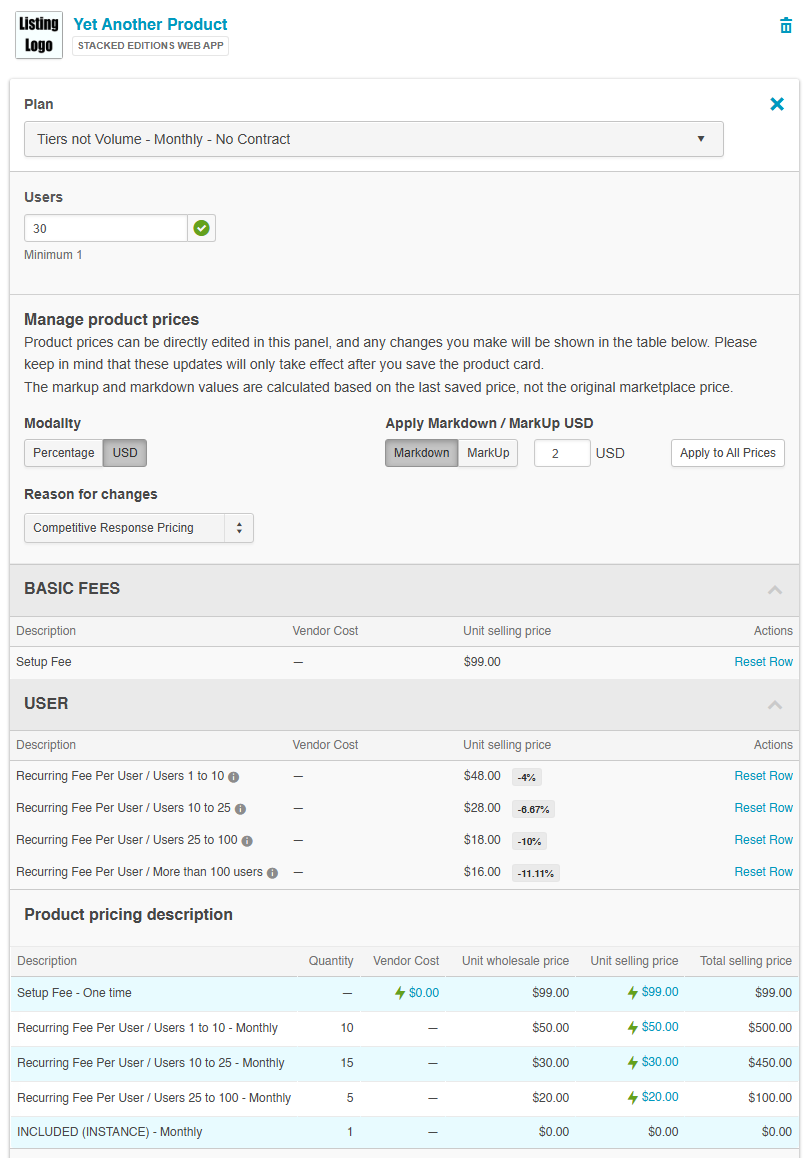
This release introduces support for custom unit selling prices per tier in tiered pricing models. Resellers can now set specific prices for each tier instead of applying a single markup or markdown percentage across all tiers.
This enhancement enables more flexible quoting and better pricing management, especially for scenarios where customers may add seats later and require predefined pricing for tiers not yet reached.
📝 Note: This feature supports both per-tier price customization and global markup/markdown actions, which can be used together or independently. Resellers can manually edit individual tier prices or apply uniform pricing adjustments across all editable prices. When applying global markup/markdown, the system calculates new values based on current prices (original or custom) and persists them as custom prices, allowing for further adjustments or per-tier fine-tuning.
Changes in the UI
The Quote configuration UI for tiered pricing products now includes a unified custom prices table that consolidates all pricing controls into a single interface. Resellers can view all tiers, edit unit selling prices per tier, and switch between per-tier and percentage-based pricing. The new table brings together custom price types such as, Vendor Cost, Wholesale Price, and Unit Selling Price, along with real-time percentage indicators, global pricing actions, and per-row editing. Tiered and Volume pricing tiers are fully displayed, allowing pricing to be set for future growth scenarios, though Vendor Cost remains read-only for these strategies. A refreshed, read-only Product pricing description section now highlights customized prices.
Feature enablement
This feature is not enabled by default. Contact your AppDirect technical representative to request it.
Setting enablement
No setting enablement is required.
Documentation
Documentation will be updated with the release.
Was this page helpful?
Tell us more…
Help us improve our content. Responses are anonymous.
Thanks
We appreciate your feedback!